
Which One Is Right for Your Team?
Category: IBM Planning Analytics | Read time: 6 min | Author: Rick Stevenson, CPA/CMGA
If your finance team runs on Excel — and let’s be honest, most do — then connecting Excel to IBM Planning Analytics is the single most impactful thing you can do for your planning process.
But which Excel add-in should you use? IBM offers its own solution (PAfe — Planning Analytics for Excel), and ForQuest Solutions has built Plaicel™, a web-based alternative designed to solve the problems PAfe wasn’t built to handle.
This post breaks down the real differences so you can make an informed decision.
The Problem Both Tools Solve
IBM Planning Analytics (TM1) is a powerful planning engine. But most end users don’t live in PAW (Planning Analytics Workspace) — they live in Excel. They need to pull TM1 data into spreadsheets for analysis, build custom reports for board presentations, and write plan values back to the model.
Both PAfe and Plaicel connect Excel to TM1. How they do it is where the differences start.
IBM PAfe: The Traditional Desktop Add-In
IBM Planning Analytics for Excel (PAfe) is IBM’s official Excel add-in. It replaced the legacy TM1 Perspectives add-in and runs as a COM add-in on Windows desktop Excel.
What PAfe does well:
- Deep integration with IBM Planning Analytics features
- Supports complex slice-and-dice operations with the Exploration view
- Direct cube view rendering inside Excel
- Included with your IBM Planning Analytics license at no extra cost
- Supports both on-premises TM1 and PA Cloud
Where PAfe creates friction:
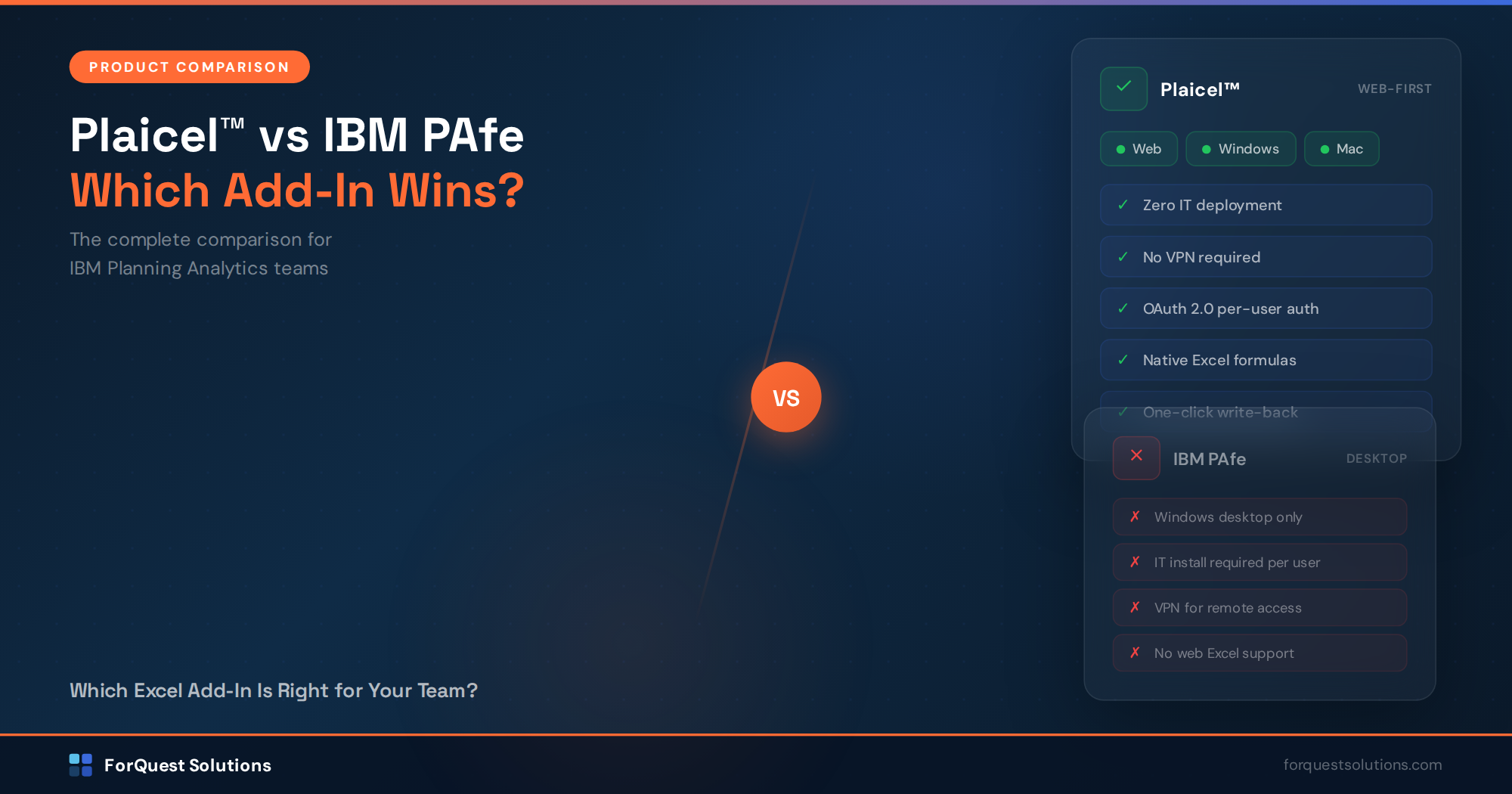
- Windows-only. PAfe does not run on Mac or Excel for Web. If your team uses anything other than Windows desktop Excel, they’re locked out.
- IT installation required. Every user needs the COM add-in installed locally by IT. For organizations with 50, 100, or 500 planners, that’s a significant deployment burden.
- VPN dependency. Remote users connecting to on-premises TM1 need VPN access. In a hybrid workforce, this creates constant connectivity issues and help desk tickets.
- Version management. PAfe versions must align with your TM1 server version. Upgrades require coordinated rollouts across every user’s machine.
- No Excel for Web support. The growing number of organizations standardizing on Microsoft 365 web apps cannot use PAfe at all.
Plaicel™: The Web-First Alternative
Plaicel™ is a web Excel add-in built by ForQuest Solutions specifically to eliminate the deployment and access barriers of traditional TM1 Excel connectivity.
How Plaicel is different:
- Web-based. Works in Excel for Web, Excel for Windows, and Excel for Mac. One add-in, every platform.
- Zero IT deployment. Users install Plaicel themselves from the Microsoft Add-In store — no IT ticket, no COM installation, no admin rights required.
- No VPN required. Plaicel connects to IBM Planning Analytics Cloud via REST API over HTTPS. Remote users connect the same way they access any cloud service.
- OAuth 2.0 authentication. Per-user authentication with your existing identity provider. No shared credentials. TM1 security applies per-user, exactly as configured in your model.
- Native Excel formulas. Plaicel introduces custom functions — PLAICEL.GET, PLAICEL.VIEW, PLAICEL.MDX, PLAICEL.PUT, and PLAICEL.ELEMENTS — that work like any other Excel formula. They recalculate, they reference other cells, they copy across ranges.
- One-click write-back. Edit plan values directly in Excel and write them back to TM1 with a single click. Changed cells highlight automatically so you know exactly what’s being submitted.
Head-to-Head Comparison
Here’s how the two solutions compare across the dimensions that matter most to enterprise planning teams:
Platform Support
PAfe works on Windows desktop Excel only. Plaicel works on Excel for Web, Windows, and Mac.
Installation
PAfe requires IT-managed COM add-in deployment on each user’s machine. Plaicel is self-service from the Microsoft Add-In store — no IT involvement.
Network Requirements
PAfe typically requires VPN for on-premises TM1 access. Plaicel connects via REST API over standard HTTPS — no VPN needed.
Authentication
PAfe uses CAM or IBM Cloud authentication. Plaicel uses OAuth 2.0 with per-user tokens and supports SSO.
Formula Support
PAfe uses TM1-specific functions (DBRW, DBRA, etc.) that require the add-in to be installed. Plaicel uses custom web functions (PLAICEL.GET, PLAICEL.VIEW) that are web-compatible and work on all platforms.
Write-Back
Both support writing values back to TM1. Plaicel highlights changed cells before submission and supports both live and deferred write modes.
Cube View
Both support interactive cube views. Plaicel adds drag-and-drop dimension management with drill-down/drill-up directly in the Excel interface.
Deployment Time
PAfe requires coordinated IT rollout (days to weeks for large organizations). Plaicel deploys in minutes with zero IT burden.
Cost
PAfe is included with your IBM Planning Analytics license. Plaicel is a separate licensed product from ForQuest Solutions.
When to Use Which
PAfe makes sense when:
- Your organization is 100% Windows desktop Excel
- You have a small, centralized user base where IT can manage installations
- You need deep TM1-specific features like Exploration views
- Budget is the primary constraint and you need a no-cost option
Plaicel makes sense when:
- You have Mac users, web Excel users, or a hybrid workforce
- You need to deploy Excel connectivity to dozens or hundreds of users without IT overhead
- Remote access is a requirement and VPN is a pain point
- You want native Excel formulas that work across platforms
- You’re on IBM Planning Analytics Cloud and want a modern, REST API-based connection
The Bigger Picture
The trend in enterprise planning is clear: web-first, cloud-first, IT-light. IBM’s own platform is moving to the cloud with Planning Analytics as a Service. Plaicel was designed for this direction — giving planning teams the Excel experience they need without the infrastructure burden they don’t.
If your organization is evaluating Excel connectivity for IBM Planning Analytics, the right choice depends on your user base, your IT model, and where you’re headed. Both tools connect Excel to TM1. The question is how much friction you’re willing to accept in the process.
Ready to See Plaicel in Action?
We offer a free, no-obligation demo where you can see Plaicel working with your own IBM Planning Analytics environment. No slides — just live Excel connected to TM1.
Schedule a Free Consultation →
Rick Stevenson is the Managing Director and founder of ForQuest Solutions, an IBM Planning Analytics consulting firm with 25+ years of TM1 expertise. ForQuest specializes in ProfitCy® pre-built planning models and Plaicel™ Excel connectivity for enterprise planning teams.