
Plaicel™ is live on Microsoft AppSource - the only IBM Planning Analytics add-in that runs in Excel Web and works on Windows, Mac, and iPad.
PLAICEL™

Plaicel™ - Live Excel Web Connectivity for IBM Planning Analytics

Install once from Microsoft AppSource. Live read/write Excel Web connectivity to your Planning Analytics model — plan data in, actuals out, real-time collaboration included.

1-Click

Live Planning Analytics Data in Excel

40%

Faster Reporting Cycle

Zero

IT Deployment Burden

THE BUSINESS CASE

Why Finance Teams Switch to Plaicel™

📊

Eliminate the "Last Mile" Problem

IBM Planning Analytics holds your data — but getting it into a polished, formatted, finance-ready Excel requires hours of copy-paste, formatting, and manual reconciliation every period. Plaicel™ removes that entirely.

⚡

Install in Seconds via Microsoft AppSource

Plaicel™ installs as an Excel Web Add-In directly from Microsoft AppSource — no IT team required, no desktop software, no VPN. Users are up and running in minutes from any browser on any device.

✍️

Write-Back Without Leaving Excel

Finance teams enter plan data directly in Excel — Plaicel™ submits it back to TM1 in real time. No web UI context switch. No data re-entry. Full TM1 security model respected.

🔄

Auto-Refresh on Any Schedule

Set reports to refresh hourly, daily, or at period close. Your CFO opens the executive financial package on Monday morning and it is already up to date — no one had to run anything.
MEASURED RESULTS

40%

Faster Reporting Cycle

95%

Less Manual Report Formatting

3×

More Scenarios Shared with Leadership

90 Days

Average Time to Go-Live

HOW IT COMPARES

Plaicel™ vs. Excel vs. IBM PAfE Add-In

Both Plaicel™ and IBM’s own Excel add-in read and write live TM1 data. The difference is reach and deployment: which versions of Excel your team can use, and what IT has to do to get there.

CAPABILITY

EXCEL

IBM PAfE

PLAICEL™

Excel for Windows (desktop)

Yes

Yes

Yes

Excel for Mac

Yes

Not supported

Yes

Excel in the browser (Excel for the web)

Yes

Not supported

Yes

Deployment method

None

Per-machine installer, distributable via SCCM or Intune

One Microsoft 365 admin deployment

Client version on PA upgrade

—

New client build distributed to each machine

Updated centrally

Live read/write to TM1

No – static extracts

Yes

Yes

Write-back to TM1 cells

Re-key or paste

Yes

Yes

MDX and subset retrieval

No

Yes

Yes

Single sign-on with your identity provider

—

Yes

Yes

TM1 security model enforced

—

Fully enforced

Fully enforced

Comparison covers IBM Planning Analytics for Microsoft Excel (PAfE), the Windows desktop add-in, as of March 2026, across both PA 2.1 and PA Engine v12 / PAaaS. PAfE is a capable, fully bi-directional TM1 client, is included with your IBM Planning Analytics license, and supports single sign-on through your own identity provider. Plaicel™ differs in how it is deployed and which versions of Excel it reaches — not in whether TM1 data can be read, written or secured.

Product Preview

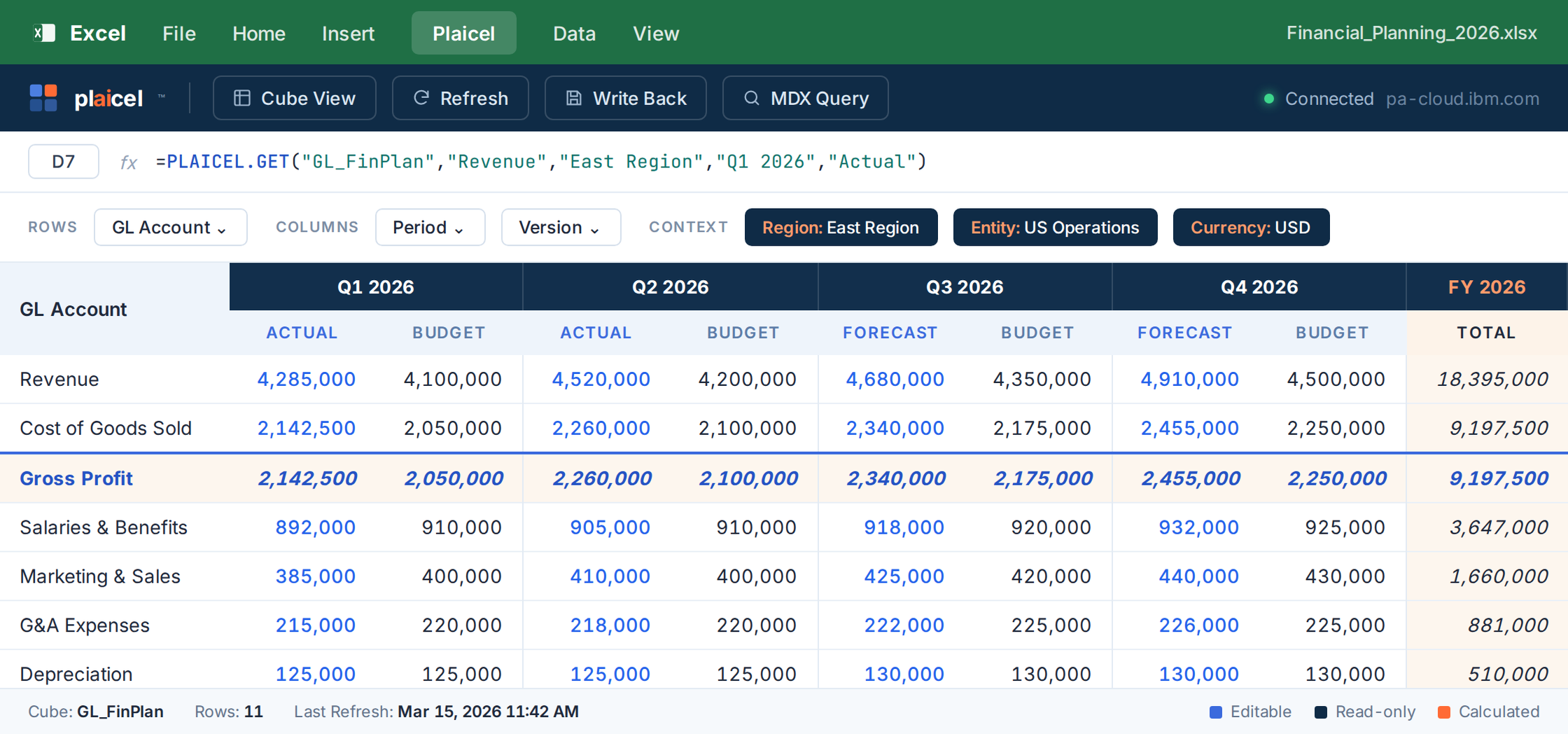
Your Team's Excel Web & Desktop. Connected to Planning Analytics.

Plaicel™ brings live TM1 data into the Excel your team already knows — with drag-and-drop cube views, native formulas, and one-click write-back. No VPN. No plugins. No IT ticket.

Plaicel™ CAPABILITIES

Everything Your Finance Team Needs — In Excel

Plaicel™ combines the familiarity of Excel with the power of IBM Planning Analytics TM1 — giving finance teams live data, write-back, scheduling, and audit in one seamless experience.

DATA ACCESS

Live Cube Browser

Navigate your full Planning Analytics model — dimensions, hierarchies, and elements — directly inside Excel.

MDX Subset Builder

Visual point-and-click subset builder. Create, save, and reuse dynamic MDX subsets that auto-update with your PA model.

Bulk Data Import

Load ERP actuals, headcount files, and historical data into Planning Analytics from Excel. Map columns visually before commit.

Works Anywhere

Plaicel runs in Excel for the web — full Planning Analytics connectivity from any browser on any device, no VPN needed.

WRITE-BACK & PLANNING

Cell-Level Write-Back

Submit plan data and driver inputs from any Excel cell directly to Planning Analytics. Full PA security model enforced.

Bulk Paste Write-Back

Write thousands of cells to Planning Analytics in one operation. Paste any Excel range, validate, and bulk-load in seconds.

Sandbox Scenarios

Each user gets a private sandbox for unlimited what-if scenarios, isolated from the live PA model until ready to promote.

Scenario Promotion

Review sandbox versions side-by-side, approve changes, and merge selected data into the base Planning Analytics model.

AUTOMATION & DISTRIBUTION

Scheduled Auto-Refresh

Auto-refresh any workbook hourly, daily, or at period close. Finance teams open Excel and data is already current.

Chore-Triggered Refresh

Tie workbook refresh to your PA chore schedule. When the chore completes, connected workbooks update automatically.

Report Distribution

Schedule and auto-email formatted Excel workbooks to stakeholder lists. Define recipients, schedules, and ranges in Plaicel.

Zero IT Deployment

Installs from Microsoft AppSource in under two minutes. No desktop software, no VPN, no IT ticket — users self-serve.

GOVERNANCE & SECURITY

Template Locking

Lock layouts and formatting so users interact only with input cells. Protect formulas and hide PA connection strings.

User-Level Security

All Planning Analytics cube, element, and dimension security is fully enforced in Excel — no bypass, no workarounds.

Audit Trail

Every write-back is logged with user, timestamp, cell address, old value, and new value — stored in PA, exportable on demand.

Multi-Entity Consolidation

Pull consolidated data across multiple PA entities into one Excel workbook. Intercompany eliminations included.

USE CASES

What Finance Teams Build with Plaicel™

From departmental budget templates to enterprise executive financial packages – Plaicel™ handles every Excel reporting scenario on IBM Planning Analytics.

Finance & Executive Reporting

✓P&L, balance sheet, cash flow in branded Excel

✓Automated variance commentary vs. budget & prior year

✓KPI dashboards that refresh at period close

✓Board package ready in minutes, not hours

FP&A Budgeting & Forecasting

✓Driver-based budget templates submitted to TM1

✓Rolling 12-month forecast with write-back

✓Departmental budget collection via locked templates

✓Version comparison: Budget vs. Forecast vs. Actuals

Workforce & HR Planning

✓Position-level headcount templates in Excel

✓Compensation and benefits write-back to TM1

✓Org-level headcount consolidation automatically

✓Scenario: hiring plan vs. freeze vs. reduction

Operations & Cost Management

✓Plant and cost center budget templates

✓Standard cost update input forms

✓CapEx planning and depreciation schedules

✓Cost variance analysis vs. standard

S&OP & Demand Planning

✓Volume and demand plan input in Excel

✓SKU-level plan write-back to Planning Analytics model

✓S&OP bridge: demand to financial plan

✓Trade spend planning at customer/product level

Regulatory & Consolidation

✓CECL reserve reporting templates from TM1

✓Multi-entity consolidation in Excel

✓Basel III capital ratio planning workbooks

✓Regulatory submission templates with audit trail

WHY FINANCE TEAMS CHOOSE PLAICEL™

The Numbers Behind the Decision

Plaicel™ is an Excel Web Add-In that connects your Planning Analytics model directly to Excel — real-time data, write-back, and collaboration with zero IT burden. These are the results finance teams see after go-live.

70%

Less Training Time

Users already know Excel — training covers PA concepts only, not a new interface

Day 1

Productive From Day One

No learning curve — finance teams submit forecasts and pull reports immediately

Zero

IT Deployment Required

Installs from Microsoft AppSource — no desktop software, no VPN, no IT ticket needed

100%

Data Stays in TM1

No disconnected spreadsheets — every entry tracked with user, timestamp, and value

30 Min

Live Demo With Your Data

We connect to your Planning Analytics environment and show live Planning Analytics data in your first call

90 Days

Average Go-Live

Pre-configured Plaicel™ models go live in 90 days — not 12-18 months

FREQUENTLY ASKED QUESTIONS

Everything You Need to Know About Plaicel

The questions we hear most often from finance and IT teams evaluating Plaicel as their IBM Planning Analytics Excel reporting layer.

Plaicel is an Excel Web Add-In for IBM Planning Analytics that lets users build live, read/write reports against TM1 cubes directly from Excel on Web, Windows, and Mac. It connects to PA via standard REST APIs and requires no per-user installation since it deploys through Microsoft 365 admin like any other Excel Web Add-In.

Plaicel is a Windows-only desktop add-in that each user installs locally — meaning IT support tickets every time Excel updates, Office repairs, or new laptops are issued. Plaicel runs as an Excel Web Add-In, so it works on Excel Web, Excel for Mac, and Excel for Windows from a single Microsoft 365 admin deployment. Users see the same functions across all three platforms with zero local installation.

Yes. Plaicel supports bi-directional read and write through the Plaicel.GET function, the same way PAfE does. Users can edit cells in Excel and commit changes back to the TM1 cube using standard PA security.

Plaicel provides 9 functions covering the full PA reporting workflow: HELLO (connection test), CUBES (list cubes), DIMENSIONS (list dimensions for a cube), GET (read/write cell value), VIEW (named view retrieval), ATTR (member attribute lookup), MDX (custom MDX query), SUBSET (subset retrieval), and SEND (write-back commit).

Plaicel works on Excel for the Web, Excel for Windows, and Excel for Mac. Because it is an Excel Web Add-In (not a desktop add-in), it deploys once through Microsoft 365 admin center and appears for all licensed users across all three Excel platforms automatically.

Plaicel deploys via Microsoft 365 admin center as a centrally-managed Excel Web Add-In. IT administrators install it once for the tenant or specific user groups, and it appears in Excel automatically for all assigned users. No per-machine installation, no Office repairs, no version drift between users.

Yes, Plaicel is listed on Microsoft AppSource as a verified Excel Web Add-In. This means it has passed Microsoft’s security and compatibility review and can be deployed through standard Microsoft 365 admin workflows.

READY TO MAKE THE SWITCH?

Bring TM1 reporting into Excel — without the IT tickets.

Plaicel is verified on Microsoft AppSource and deploys organization-wide through Microsoft 365 admin in under 30 minutes. Free for 30 days — no credit card required.

Connect Excel to IBM Planning Analytics - Free for 30 Days

No installation. No migration. No retraining. Your team keeps working in Excel while Plaicel™ syncs live to TM1.

Then 50% off your first year. From $24.99/user/mo*

*billed annually

Free for 30 days · No credit card required