
Category: IBM Planning Analytics | Read time: 8 min | Author: Rick Stevenson, CPA/CMGA
If you’re running IBM Planning Analytics on-premises, the clock is ticking. IBM is investing heavily in Planning Analytics as a Service (PAaS) — the cloud-native version of the platform — and the feature gap between cloud and on-prem is widening with every quarterly release.
The question isn’t whether to migrate. It’s when, and how to do it without disrupting your planning cycles.
This guide covers the practical realities of migrating TM1 to the cloud in 2026 — what’s changed, what to watch out for, and how to build a migration plan that your CFO, your IT team, and your end users can all get behind.
Why 2026 Is the Migration Tipping Point
Three forces are converging that make 2026 the year most TM1 shops need to make a decision:
IBM’s roadmap favors the cloud. New features — AI-powered forecasting with Planning Analytics Accelerator, enhanced collaboration, and modern REST APIs — are landing in PAaS first and in some cases exclusively. On-premises customers are getting maintenance updates, not innovation.
Infrastructure costs are rising. If you’re running TM1 on-prem, you’re paying for server hardware, Windows Server licenses, TM1 application server maintenance, backup infrastructure, and the IT staff to manage it all. IBM Planning Analytics as a Service eliminates this entire stack.
The workforce has changed. Your planning team is hybrid or fully remote. On-premises TM1 accessed through VPN creates friction — slow connections, dropped sessions, and IT tickets. Cloud-native access over HTTPS eliminates all of it.
What “Cloud Migration” Actually Means for TM1
Let’s be precise about terminology because IBM uses several product names:
IBM Planning Analytics as a Service (PAaS) is the fully managed cloud version. IBM hosts, manages, and updates the TM1 engine. You manage your models, data, and users. This is where IBM is directing investment.
IBM Planning Analytics on Cloud Pak for Data is the containerized version running on Red Hat OpenShift. It gives you cloud deployment with more control over the infrastructure. This is a middle ground for organizations with strict data residency or compliance requirements.
IBM Planning Analytics Local (on-premises) is the traditional server-based deployment that most existing TM1 customers are running today.
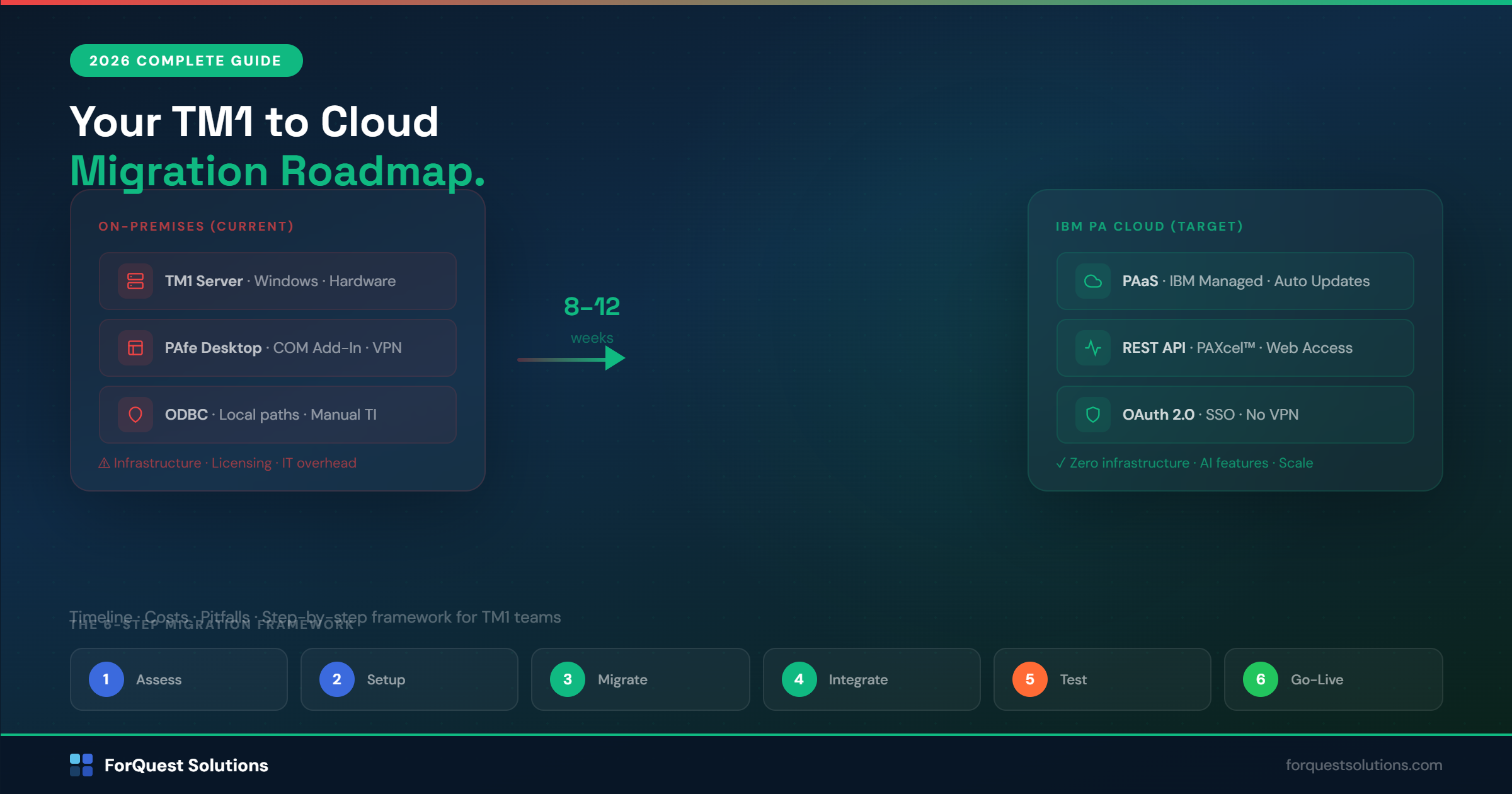
When we say “cloud migration,” we typically mean moving from Local to PAaS — which is the path IBM recommends and where the majority of new features will land.
The 6-Step Migration Framework
After migrating multiple TM1 environments to the cloud, we’ve developed a structured approach that minimizes risk and keeps your planning process running throughout the transition.
Step 1: Assessment (1–2 Weeks)
Before you touch anything, you need a clear picture of what you have.
Model inventory. Document every TM1 server, model, cube, dimension, rule file, TI process, and PAW dashboard. Most organizations are surprised by how much has accumulated — orphaned models, test instances, processes that nobody remembers building.
Data integration map. Identify every data feed coming into TM1 (ERP, GL, HR systems, manual uploads) and every output (reports, data exports, downstream feeds). These integrations are the most fragile part of any migration.
User analysis. Who accesses TM1, how, and from where? PAW users, PAfe users, API consumers, TI-scheduled processes. Each has different migration implications.
Custom code audit. Review TM1 rules, feeders, and TI processes for anything that uses on-premises-specific features: local file paths, Windows authentication, COM-based integrations, or hard-coded server names.
Step 2: Cloud Environment Setup (1 Week)
Provision your PAaS instance through IBM. Key decisions at this stage:
Region selection. Choose the IBM Cloud region closest to your users. For most US-based companies, that’s US South (Dallas) or US East (Washington DC).
Sizing. PAaS is usage-based, but you need to right-size your initial allocation. We analyze your current memory footprint, concurrent user count, and peak processing loads to recommend the right tier.
Identity and access. Configure IBM Cloud IAM integration with your existing identity provider (Azure AD, Okta, etc.) for single sign-on. This is also the time to clean up your TM1 security model — don’t migrate stale users and over-permissioned groups.
Step 3: Model Migration (2–4 Weeks)
This is the core of the project. The mechanics of moving TM1 models to PAaS involve:
Export from on-premises. Use TM1’s native backup/restore or IBM’s migration utilities to export your model files (dimensions, cubes, rules, views, subsets).
Import to PAaS. Load the model into your cloud instance. IBM provides migration tooling, but it’s not always seamless — rule file syntax, TI process paths, and data source references typically need modification.
Refactoring. This is the most important step and the one most teams underestimate. On-premises TM1 models often contain:
- File paths referencing local directories (C:\TM1Data…)
- TI processes using ODBC connections to on-premises databases
- Windows-specific authentication references
- Hard-coded server names in rule files
- Deprecated functions or syntax that PAaS doesn’t support
Each of these needs to be identified and updated. This isn’t a lift-and-shift — it’s a lift, clean, and shift.
Step 4: Data Integration Rebuild (2–3 Weeks)
Your data feeds need to reach the cloud. Options include:
REST API integration. PAaS exposes a comprehensive REST API. Modern ERP systems and iPaaS tools (Azure Data Factory, MuleSoft, Informatica) can push data directly to TM1 via API.
IBM Planning Analytics Workspace integrations. PAW includes native connectors for common data sources.
Turbo Integrator in the cloud. TI processes run in PAaS, but they can’t reach on-premises databases directly. You’ll need to either migrate your source data to a cloud-accessible location or use a gateway/proxy service.
File-based feeds. For organizations that aren’t ready for API-based integration, PAaS supports file upload via the TM1 Content Store or SFTP. This is the simplest migration path for data feeds, though not the most elegant long-term solution.
Step 5: User Acceptance Testing (2 Weeks)
Run a full planning cycle in the cloud environment before cutting over:
- Budget entry and submission workflow
- Forecast refresh from source systems
- Consolidation and currency conversion
- Report generation (PAW dashboards and Excel-based reports)
- Write-back and approval processes
- Performance comparison (cloud vs. on-prem response times)
Your end users should test their actual workflows, not just validate data. The goal is to confirm that the cloud experience is equal to or better than what they had on-premises.
Step 6: Cutover and Decommission (1 Week)
Plan your cutover for a period of low planning activity — not during budget season.
Final data sync. Run a last synchronization to capture any changes made in the on-premises system since migration started.
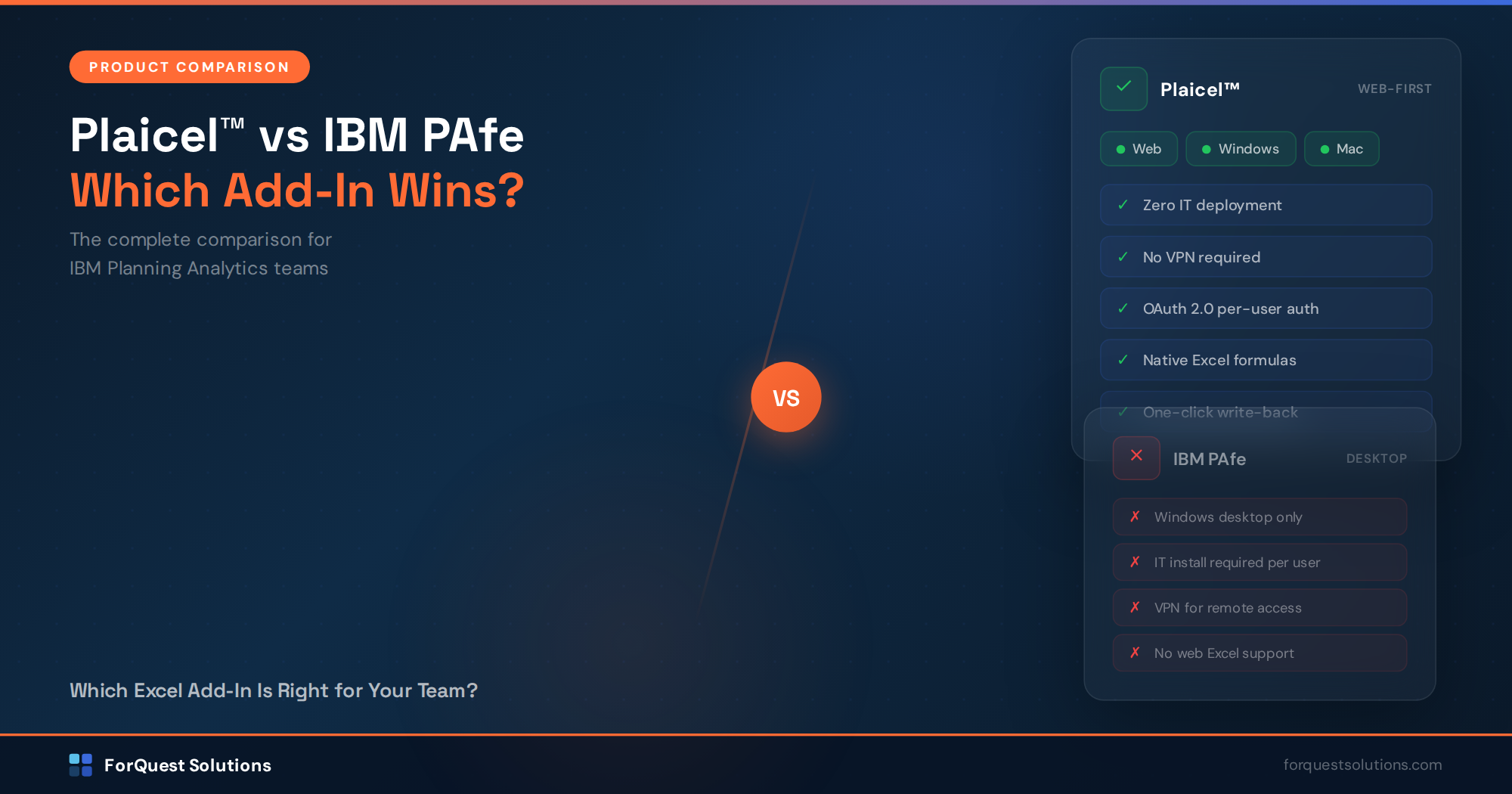
DNS/access switch. Redirect users from the on-premises URL to the PAaS URL. If you’re using Plaicel™, this is a configuration change — point to the new cloud endpoint.
Parallel run (optional). Some organizations run both environments for 1–2 weeks as a safety net. This is good practice but requires discipline to avoid confusion about which system is the source of truth.
Decommission. Once confirmed, shut down the on-premises TM1 servers, cancel associated infrastructure costs, and archive your final backup.
Common Migration Pitfalls
Pitfall 1: Treating it as a lift-and-shift. Models that worked fine on-premises may have performance issues in the cloud due to different memory management, network latency, and processing architecture. Budget time for performance tuning.
Pitfall 2: Ignoring the TI process migration. TI processes are the most labor-intensive part of migration. Every data source reference, file path, and authentication method needs to be validated and updated.
Pitfall 3: Migrating technical debt. If your on-premises model has years of accumulated workarounds, orphaned cubes, and undocumented rules, don’t move that mess to the cloud. Migration is the ideal time to clean house.
Pitfall 4: Underestimating change management. Your end users are comfortable with the on-premises experience. Moving to cloud changes their login process, their bookmarks, and potentially their Excel connectivity. Communication and training matter.
Pitfall 5: Migrating during budget season. This sounds obvious, but we’ve seen it attempted. Plan your migration for a quiet period in your planning calendar.
Timeline and Cost Expectations
For a typical mid-market TM1 environment (1–3 models, 50–200 users, 5–15 data integrations), expect:
Timeline: 8–12 weeks for a well-planned migration. Complex environments with multiple models, extensive custom TI processes, or regulatory requirements may take 12–16 weeks.
Effort: 200–500 consulting hours depending on model complexity and the state of your current environment.
Cost factors: IBM PAaS subscription (replacing your on-premises license and infrastructure), consulting fees for the migration itself, and internal team time for testing and validation.
ROI drivers: Eliminated infrastructure costs (servers, OS licenses, backup systems), reduced IT support burden, improved user experience for remote workers, and access to new cloud-only features.
Most organizations see a positive ROI within the first year when factoring in infrastructure savings alone — before counting the productivity gains from cloud-native access and new features.
Should You Modernize Your Models at the Same Time?
This is the most strategic question in any cloud migration. You have two options:
Migrate as-is, modernize later. Get to the cloud first with your existing model structure, then invest in improvements. This minimizes migration risk but means you’re running an old model on new infrastructure.
Modernize during migration. Rebuild your models using a modern framework (like ProfitCy® pre-built models) and deploy directly to the cloud. This takes slightly longer but delivers a fundamentally better planning environment from day one.
Our recommendation depends on your situation. If your current models are functional and well-maintained, migrate as-is. If your models are aging, poorly documented, or struggling with performance issues, migration is the perfect forcing function to rebuild on a modern foundation.
Next Steps
Cloud migration is a significant project, but it’s not the multi-year odyssey that some firms make it out to be. With the right planning and experienced guidance, most TM1 environments can be running in the cloud within 8–12 weeks.
If you’re evaluating a cloud migration — or if you’ve been told it’s too complex and expensive — we’d welcome a conversation. We offer a free cloud readiness assessment where we review your current TM1 environment and give you a realistic timeline, scope, and cost estimate.
Schedule a Free Cloud Migration Assessment →
Rick Stevenson is the Managing Director and founder of ForQuest Solutions, an IBM Planning Analytics consulting firm with 25+ years of TM1 expertise. ForQuest has migrated multiple enterprise TM1 environments to IBM Planning Analytics Cloud and specializes in ProfitCy® pre-built planning models and Plaicel™ Excel connectivity.