


Straight-Line Distance Calculation
Straight-line distance otherwise known as how the crow flies is the simplest way of measuring distance between two destinations. However, this distance can be calculated using different formulas based on a variety of assumptions.
Pythagorean Theorem:
Distance = SQRT((X2 – X1)^2 + (Y2 – Y1)^2)
Where X1, Y1 and X2, Y2 are the Cartesian coordinates of your destinations.
You can only use this equation when your coordinates are projected geographical coordinates and the distance between the two destinations is less than 12 miles (20 kilometers).
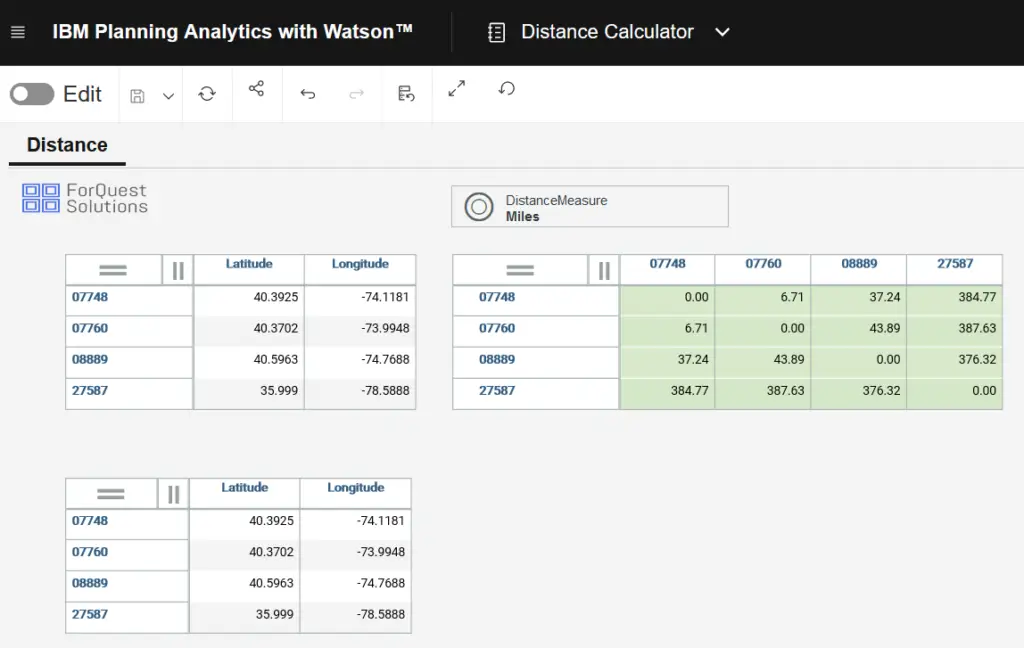
- Below are the steps to create a zip to zip calculator in IBM Planning Analytics.
Step 1: Create 2 dimensions in Planning Analytics (From Zip and To Zip)
Step 2: Create latitude and longitude numeric attributes on both dimensions.
Step 3: Populate the US zip code elements in both dimensions
Step 4: Populate the latitude and longitude attributes on both dimensions.
Step 5: Create a Measure dimension for your cube and call it “Distance Measure”
Step 6: Create a cube called Distance
Step 7: Create a cube business rule on the Distance cube
Step 8: Add the following rules to the cube and save the rule
- [‘Miles’] = N: SQRT((69*(ATTRN(‘FromZip’,!FromZip,’Latitude’) – ATTRN(‘ToZip’,!ToZip,’Latitude’)))^2 + (53*(ATTRN(‘FromZip’,!FromZip,’Longitude’)-ATTRN(‘ToZip’,!ToZip,’Longitude’)))^2);
- [‘Kilometers’] = N: [‘Miles’] * 1.60934;